October 22, 2026

The PHP Vulnerability Impacting 75% of Websites And What To Do About It

The "PHP2Shell" vulnerabilities put the internet at risk, here's everything you need to know
A woman holds a phone displaying a Google Gemini prompt and reply about llms.txt files. It's used to illustrate a blog by Fifty2M about the whether a website needs an llms.txt file to be cited in AI search results

The Context: What is PHP2Shell and How Was It Discovered?

‍

On 20th October 2026, the cybersecurity community was rocked by the disclosure of "PHP2Shell," an emergency-level set of security flaws in PHP, an open-source programming language that's widely used in the development of traditional websites.

‍

This comprises two critical vulnerabilities CVE-2026-109618 and CVE-2026-109619.

‍

Wiz researchers made the discovery with the assistance of advanced large language models, including Gemini 4 Argon and GPT-5.6 Sol, alongside their proprietary Wiz Atlas tool.

‍

BBC News has live updates on this unfolding situation.

‍

Who is Affected?

‍

If your website runs on PHP, consider it vulnerable. According to some estimtes, this accounts for 75% of all websites globally.

‍

The vulnerability impacts PHP versions 5.4 through 8.5. This means that every default PHP installation serving web requests is at risk, including environments running PHP-FPM, Apache with mod_php, php-cgi, FrankenPHP, and LiteSpeed. The PHP team considers Apache mod_php setups to be at the highest risk.  

‍

Because PHP powers massive content management systems, servers hosting applications like WordPress, Drupal, Nextcloud, Magento, WooCommerce, and phpMyAdmin are prime targets and require urgent updates.  

‍

The Impact: What Can Threat Actors Achieve?

‍

The most terrifying aspect of PHP2Shell is that it allows for unauthenticated remote code execution (RCE). Threat actors can run malicious code on your server without ever logging in.  

‍

By successfully exploiting these bugs, attackers can achieve complete server takeover. The immediate goals are typically deploying a web shell for persistent access, pivoting to compromise the wider network, triggering arbitrary file reads to steal sensitive data, or causing memory disclosure.

Alarmingly, active attacks and proofs of concept (PoCs) are already being witnessed.

‍

Detection: How to Check Your PHP Version

‍

Before you panic, you can quickly check if your website is broadcasting its vulnerable PHP version to the public.
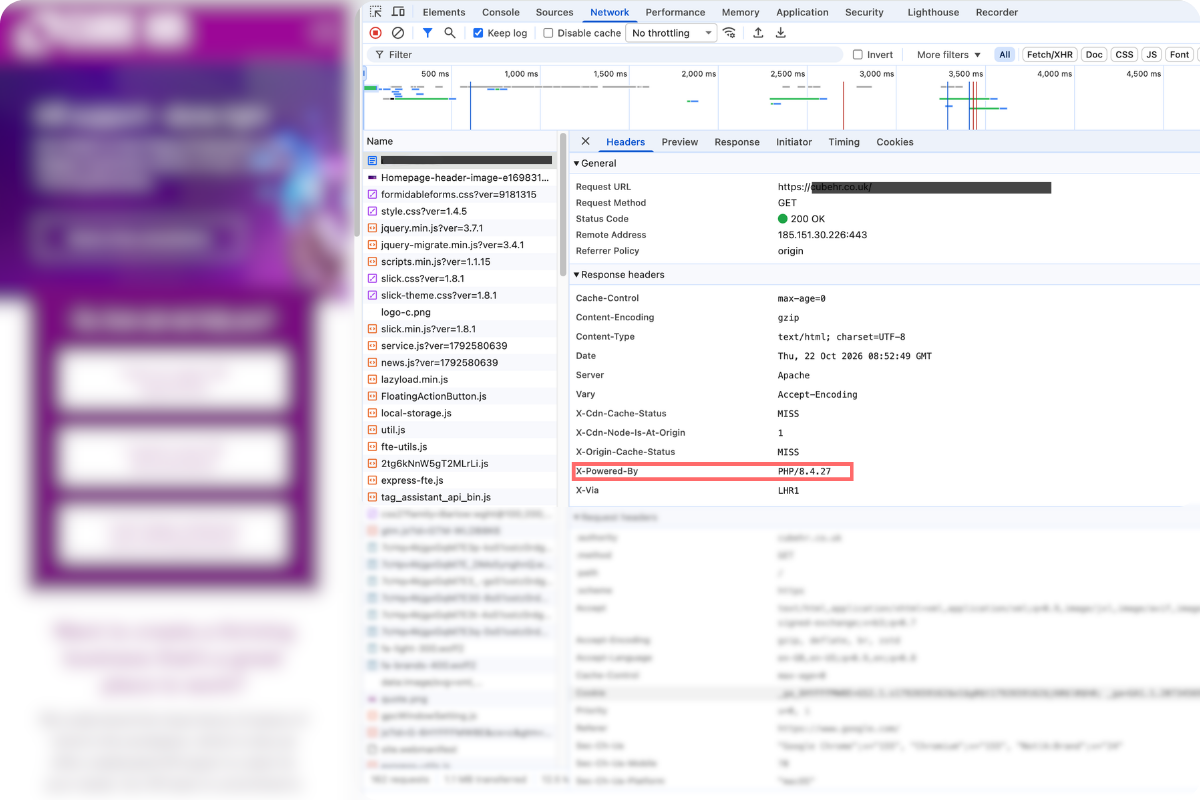
Using Chrome Developer Tools:

  1. Open your website in Google Chrome.
  2. Press F12 (or right-click and select Inspect) to open Developer Tools.
  3. Navigate to the Network tab and refresh your page.
  4. Click on the very first request in the list (usually your website's main domain).
  5. In the right-hand panel, scroll down to the Response Headers section.
  6. Look for a header named X-Powered-By. If it displays a PHP version (e.g., X-Powered-By: PHP/8.1.10) that is not one of the patched versions, you are highly likely exposed.

‍(Note: Many security-hardened servers hide this header, so its absence does not guarantee you are safe)

‍

Using Free Online Scanning Tools:You can also run your website's URL through free online services like SecurityHeaders.com or dedicated website vulnerability scanners like the Pentest-Tools PHP2Shell Scanner or Aikido PHP2Shell Checker. These tools inspect your site's HTTP headers and will easily flag if an outdated or exposed PHP version is being served to the internet. You can use tools like Wappalyzer or BuiltWith to get a quick sense of whether your site has been created using software likely to be affected.

‍

Managed Hosts: What if the Headers Point to WP Engine or Similar?

‍

If, when inspecting your site using the Chrome Developer approach described above, you find headers associated with managed hosts like WP Engine (or Kinsta, Flywheel, and WordPress.com), this is generally reassuring, but it requires immediate verification.

  • Automated Infrastructure Patching: Managed WordPress hosts control the underlying server runtimes and typically push ecosystem-wide engine updates, worker reboots, and platform-level firewall mitigations automatically.
  • The Legacy Version Trap: Most managed hosts allow site owners to choose their environment's PHP version in their control panel. Upstream PHP maintainers only produce official updated binary releases for actively supported versions (PHP 8.2 through 8.5). End-of-Life (EOL) versions (such as PHP 7.4, 8.0, and 8.1) received source-code patches only.  

‍

What About Websites Built On Wix And Similar No-Code or Low-Code Builders?

‍

Pure Software-as-a-Service (SaaS) platforms do not run their core application infrastructure on PHP. Shopify runs on Ruby on Rails, Go, and React; Squarespace runs on Java and Node.js; Wix runs on Scala and Java. If your entire website is built and hosted natively on one of these closed platforms, your site does not execute PHP code and is not directly exposed to PHP runtime engine vulnerabilities.

‍

This is one of many reasons why we no longer build websites and landing pages in Wordpress, and instead use platforms like Webflow (which our own website runs on) and Leadpages, which we use for many sites and especially the landing pages we pair with ads. If we've built a website or a suite of landing pages for you in the past five years, you are not direclty affected by this PHP vulnerability.

‍

However, there are some indirect risks you should consider if your website is built on an SaaS platform:

  • WordPress Sites Using Shopify (e.g., Shopify Buy Buttons or WP Shopify): In this setup, the e-commerce processing on Shopify's cloud is secure, but the WordPress host running PHP is fully exposed. If attackers compromise your unpatched PHP server, they don’t need to hack Shopify directly - they can inject client-side credit card skimmers (Magecart-style attacks), rewrite payment buttons to divert checkouts, or siphon customer PII before data is ever submitted to Shopify.
  • Third-Party Embedded Forms vs. Native PHP Forms: Form builders hosted entirely on third-party SaaS infrastructure (such as Typeform, HubSpot, or Jotform embeds) do not execute on your server. However, self-hosted WordPress form plugins like Gravity Forms, WPForms, or Contact Form 7 run directly inside the PHP engine.

‍

Issues Specific to WooCommerce

‍

Unlike closed SaaS platforms, WooCommerce is squarely in the crosshairs. Because WooCommerce is a self-hosted WordPress plugin, it executes entirely within the server's local PHP runtime.

‍

WooCommerce itself issued an urgent advisory echoing cyber authorities like the UK NCSC: store owners must patch their server-level PHP engine immediately or consider taking their checkout/store offline until mitigated.

‍

Here's what you need to know if your website has the WooCommerce integration for any form of ecommerce - including taking donations if you're a charity:

‍

The Plugin Update Myth

‍

The most critical misconception among store owners is assuming an update will arrive via the WordPress plugin dashboard.

  • Updating the WooCommerce plugin will not fix this. The vulnerability exists within the C-based PHP runtime engine itself (how it handles memory allocation, request terminations, and global state), not in the application-layer PHP code written by WooCommerce.
  • Even if WooCommerce, WordPress core, and all extensions are on their latest versions, the store remains completely vulnerable if the hosting server runs an unpatched PHP version.  

Why WooCommerce Sites Are The Most Attractive To Threat Actors

‍

While attacking a standard website or blog yields limited value, attacking a WooCommerce store provides direct financial incentives:

  • Digital Skimming (Magecart Attacks): With unauthenticated Remote Code Execution (RCE), attackers do not need to take the site down. Instead, they inject subtle JavaScript into checkout templates or theme headers. When customers enter credit card numbers, CVVs, and billing addresses, that data is silently copied and exfiltrated to attacker-controlled infrastructure before the order completes.  
  • Extraction of wp-config.php and API Keys: Full server takeover allows attackers to dump the database and inspect configuration files. This immediately compromises database credentials, order histories, customer PII, and API keys/webhook secrets for connected payment gateways (e.g., Stripe, PayPal, Authorize.Net, Square).
  • Payment Redirection Fraud: Attackers can alter checkout logic or payment gateway settings in the database to redirect payout destinations or route customer payments into fraudulent merchant accounts.

‍

WooCommerce Comes With Broad, Unauthenticated 'Attack Surfaces'

‍

WooCommerce is designed to serve shoppers without requiring them to log in. To deliver dynamic cart features, it exposes multiple public-facing endpoints:

  • Dynamic AJAX Endpoints: Requests hitting /?wc-ajax=get_refreshed_fragments or cart update hooks can be hammered with malformed or oversized payloads.
  • REST API & Checkout Routes: Endpoints under /wp-json/wc/store/ or the checkout form accept complex multipart inputs, high-volume parameters, and session states.
  • Because PHP2Shell exploits out-of-memory (OOM) aborts and stale worker states, attackers can repeatedly trigger fatal memory limits on these public e-commerce endpoints to prime the PHP worker for code execution.  

‍

The Legacy PHP Stumbling Block

‍

WooCommerce stores suffer disproportionately from "update paralysis." Store owners often pin their environments to older, unsupported PHP releases (like PHP 7.4, 8.0, or 8.1) out of fear that modern PHP runtimes will break custom themes, shipping calculators, or third-party payment extensions.

  • Upstream PHP maintainers did not release official updated binaries for PHP 7.4 through 8.1; those versions are past End-of-Life (EOL).  
  • Running an e-commerce store on an EOL PHP branch now represents a severe operational liability. If a host cannot provide a verified backported patch, the runtime must be upgraded to a supported branch (PHP 8.2, 8.3, 8.4, or 8.5) and patched immediately.  

‍

Immediate Action Plan for WooCommerce Merchants

  1. Verify Engine Version in WordPress: Go to Tools > Site Health > Info > Server inside your WordPress admin. Check the exact PHP version. If it is not one of the safe releases (8.2.35, 8.3.36, 8.4.27, or 8.5.12), contact your host or server administrator to upgrade immediately.  
  2. Restart PHP Processes: After updating, verify that the host has restarted PHP-FPM or Apache workers so vulnerable processes are completely cleared from memory.
  3. Engage Cloud-Level WAF Rules: Route DNS through a WAF like Cloudflare, Fastly, or Sucuri. Ensure active managed rulesets are applied to filter known exploit patterns targeting PHP request headers and bodies.  
  4. Audit Checkout & File Integrity: Use server-side security scanners (or security plugins like Wordfence or Sucuri) to scan wp-content/themes, wp-content/plugins, and core files against pristine repository checksums. Look closely for unauthorised modifications to checkout scripts or newly created .php files in wp-content/uploads/.

‍

‍

Top 5 Actions to Take RIGHT NOW

‍

Because active exploitation is underway, organisations must treat this as an absolute emergency. Here are your top 5 immediate actions:  

  • Patch Immediately: Update to the official safe versions released by the PHP team: 8.5.12, 8.4.27, 8.3.36, or 8.2.35. If you rely on a Linux distribution package manager, watch for their vendor-updated packages and apply them as soon as possible. If you find your website is running on a managed host like WP Engine, log into the customer portal immediately and check what PHP version your environment is pinned to. If your site is running a deprecated branch (PHP 7.x or 8.0), do not rely on compatibility layers - test your site in a staging environment and upgrade the runtime to a supported, patched version (PHP 8.2 or higher).  
  • Restart All PHP Workers: Updating the software isn't enough on its own. You must restart all services running PHP (such as PHP-FPM, Apache, and queue workers) to clear the old, vulnerable PHP engine out of active memory.  
  • Apply Emergency Mitigations (If You Can't Patch): If patching is delayed, you can make exploitation harder by editing your PHP configuration settings. Set session.upload_progress.enabled = 0 to block the known session exploit route. For PHP 8.5 environments, set fatal_error_backtraces = 0. Additionally, consider restricting request body sizes by setting a low post_max_size.  
  • Deploy Web Application Firewall (WAF) Rules: Leverage your WAF (such as Cloudflare, which has already deployed protections) to filter and block malicious requests attempting to trigger the vulnerability.  
  • Isolate Unpatchable Systems: If an affected system cannot be patched immediately, consider null routing or isolating it from public internet networks until the fix is applied. Taking the application offline temporarily is a better alternative to leaving a vulnerable door open on a server that holds your data.  

‍

If you lack the in-house technical capabilities to manage these actions, speak to whoever manages your website and/or server externally, and instruct them to urgently conduct a review to determine the version of the PHP your website is running, and to take the necessary corrective actions on your behalf.

‍

‍

Websites
Website Developmnent